Agentic search pairs a conversational AI assistant with a live, interactive canvas, so customers describe what they want instead of wrestling with filters. A repeatable AI-native search pattern, shown across three niches.
Lately we've built basically the same thing for three businesses that have nothing in common, and it's quietly become one of my favourite things we make. A holiday-lettings brand. An estate agent. A high-street cosmetics shop. The only thread between them: all three sell from a big catalogue, and all three had customers stuck wrestling with search.
The industry has a few names for it: agentic search, AI-native search, conversational search, an AI shopping assistant or product finder. Whatever you call it, the shape is the same, and this is a write-up of the pattern itself: what it is, why we keep reaching for it, and what it looks like across three very different niches.
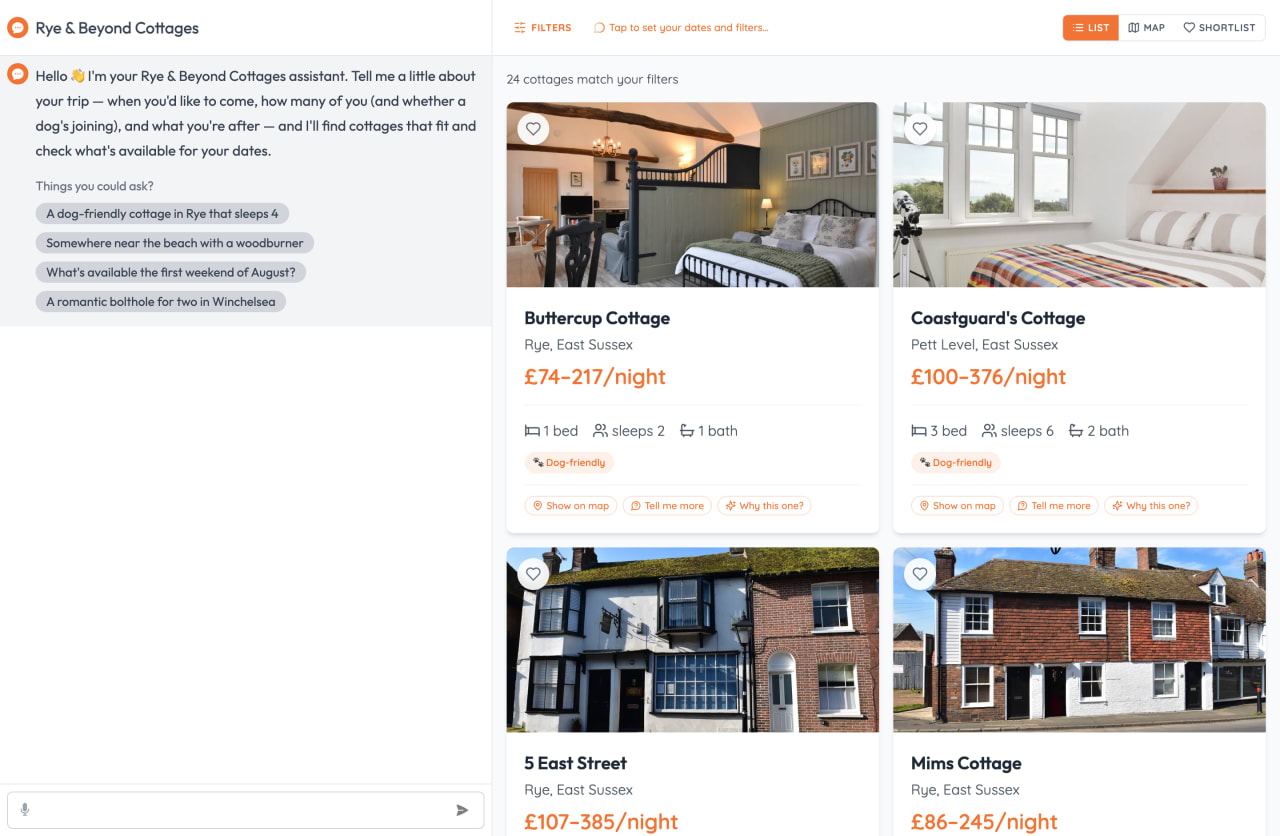 The pattern at a glance. A sidekick on the left, the live catalogue on the right, one shared surface.
Think about how you actually search the web
Picture the last few times you searched for something with options. Booking a holiday cottage: a map, a price slider, and a stack of checkboxes for hot tub, dog-friendly, parking, wifi. Hunting for a flat: beds, radius, price, then fifteen tabs open comparing them by hand. Shopping for a face cream: a grid of fifty products and a filter for "dry skin" and "under £20." Buying a laptop, a sofa, a car. It's all the same shape.
And every one of them starts from the database, not from you. The site shows you the fields it happens to store, lays them out as toggles, and leaves you to do the translating. You turn up with a real, messy need ("somewhere we can take the dog and the toddler for a long weekend, near a beach, not a four-hour drive") and you have to break that down into the boxes on offer, tick them, scan the list, adjust, repeat. Keyword search doesn't save you either. It matches the words you typed, not what you meant.
 This is what "search" usually means: a wall of toggles, and it's on you to translate your holiday into the right combination of them.
It works. We've all done it for twenty years. But notice that the work is entirely on you.
The pattern: a sidekick and a canvas
The version we keep building flips that around. There are two halves to the screen.
On one side, a conversational sidekick. You tell it what you actually want, in your own words. On the other side, an interactive canvas: the real, live, filterable result space, the same one you'd normally be poking at with toggles. The good bit is that the sidekick drives the canvas. It doesn't answer in a little chat bubble and leave you to go clicking. It does the clicking. It records your preferences, runs the search, sets the results, opens things, compares them, plots them on a map.
And the canvas is still completely usable by hand. Filter something yourself and the chips update. Ask the sidekick and the same chips update. There's one shared source of truth underneath, so the two never drift apart. You can lean on the assistant or grab the wheel whenever you fancy.
You start from your requirements. It handles the translation into filters. That's the whole idea behind agentic search: a search experience an AI agent actually operates, rather than a chatbot parked next to one.
Why agentic search beats a wall of toggles
A handful of reasons, and they hold up across every niche we've tried it in.
It starts from intent, not from the schema. You describe the outcome you want in plain language, and the agent maps it onto the actual facets and a real semantic search. This is the bit traditional faceted search can't do: natural-language search that reads meaning, so you stop reverse-engineering your own holiday into checkboxes.
It guides you to requirements you didn't know you had. This is the one that surprises people. A good salesperson asks the questions you hadn't thought of. "Is anyone in the group a light sleeper?" "Do you need to be near a station?" "What's your skin like in winter versus summer?" The sidekick does the same. It draws out the criteria you'd otherwise only discover halfway down the results page, and folds them in before you've wasted any time.
It enriches the results with stuff you'd otherwise go and research yourself. Because the agent is driving a real app, it can pull in data that lives outside the catalogue and layer it onto the canvas. Nearby beaches and pubs for a cottage. School catchments, crime and commute times for a house. It quietly does the second job, the one where you'd normally copy an address into three other tabs to find out if it's any good.
Everything it does, you could have done. Every action is a real button on the page, just operated by the assistant, and you can watch it happen. No separate AI black box, no second copy of the truth.
It's dynamic. You can ask follow-ups, change your mind, narrow things down, compare three side by side, all in the same conversation, and the canvas keeps up. No dead ends, no filling the form in again from scratch.
Three niches, one pattern
Holiday lettings, for Rye & Beyond. This is the one we've taken furthest. You can browse the full cottage catalogue, search it by meaning rather than keywords, and see live availability with real stay prices for your dates, all on one surface. Ask for "a dog-friendly cottage in Rye that sleeps four" and the concierge records the preferences, checks live dates, and writes the results straight into the grid. Booked cottages stay on the page, greyed out, so nobody hits a dead end. Lean towards one and it plans the trip around it: local events during your stay, nearby beaches and pubs plotted on a map, a day-by-day itinerary emailed with a booking link. And it never claims a cottage is free until the live check has actually run.
 Ask in plain English and watch the grid answer. Each step the agent takes is a real, visible action on the page.
 Lean towards a cottage and the concierge plans the trip: a day-by-day itinerary built from real events and nearby places, plotted as a timeline on the map.
Skincare, for a high-street cosmetics shop. This is the genuinely different one, and the one we built as a prototype. We took the kind of skin-routine finder a high-street cosmetics shop runs, a multi-step quiz that ends in product recommendations, and rebuilt it as a conversation. Instead of self-diagnosing through a product grid, you just talk: the agent asks about your skin type, your concerns, your age, any sensitivities, what you've already tried. As you answer, a profile card on the right fills in field by field, out in the open, and a tailored set of products animates in underneath, each with a one-line "why this fits you." There's a strip of ingredient pills (hyaluronic acid, retinol, niacinamide and friends) you can tap to learn what they actually do, and the agent assembles the whole thing into a proper step-by-step routine rather than leaving you to work out the order. It's the same job as the old quiz, but it feels like talking to a knowledgeable assistant on the shop floor instead of filling in a form.
 The skin profile builds in the open as you talk (top right), and the agent assembles a step-by-step routine underneath. Each product has "Why for me?" and "What's in it?" buttons that drop the question straight back into the chat.
Property sales. This is where the pattern started for us. Finding a house is never really about the house, it's about everything around it, so this is the build where the canvas leans hardest on the map. It sits as an "AI search" tab right next to the classic filter search, sharing the same shortlist and results, so nobody's forced to use it. You tell the agent how you live ("relocating from Bristol, two kids, partner works in Truro, around £450k, want a garden") and it fills in a preferences card and runs the search. Then the clever bit: ask about schools and it paints a schools layer onto the map; ask about crime, or your commute to a postcode, and it swaps in those overlays with drive times per property. It reads each listing for red flags you'd otherwise miss (leasehold running down, no parking, sale subject to chain), and if something sits just over your budget but ticks everything else, it says so and lets you decide rather than silently hiding it. Less a filter, more a buyer's agent.
 Tell the agent how you live and the canvas becomes a map: property pins, a layer of nearby places like schools and stations, and each home's distance to the things you care about.
Three catalogues that could not be more different. The same two-surface shape underneath each.
The little touches they all share
The fun part of building this three times is watching the same small UX moves turn up again and again, because they just work. A few we reach for every time:
A living profile that the agent fills in as you talk. Every build has a card on the canvas that quietly accumulates what the agent has learned about you. Cottage preferences for Rye & Beyond, a skin profile for the cosmetics finder, a relocation brief for the property search. It does two jobs at once: it's the thing the results are filtered against, and it's a receipt. You can see exactly what the agent thinks you want, correct it if it's wrong, and watch the canvas re-flow when you do. No more wondering why you got the results you got.
Buttons that talk back to the chat. The conversation doesn't only flow one way. The results have buttons on them that drop a message back into the chat for you. Tap "Is this right for me?" on a skincare ingredient and it asks the agent that question in context, against your profile and the products on screen. Open a property and ask "what would my commute look like?" right there in the detail view. It means you're never stuck hunting for the words. The canvas suggests the next good question and the agent answers it.
One shared brain behind both panes. Anything you do by hand and anything the agent does write to the same place, so the two never disagree. Filter manually, the agent knows. Let the agent set the results, the filters update to match. Shortlist something in the classic tab and it's there in the AI tab too. There's one source of truth, not an assistant guessing at a screen it can't see.
A canvas that changes shape to suit the question. Same surface, different views depending on what you're doing: a grid while you browse, a map when location matters, a side-by-side compare when you're deciding between a few, with the agent writing honest pros and cons for each against what you said you cared about.
 The canvas becomes a map when location matters, enriched with nearby places the catalogue doesn't hold.
 Ask to compare and the canvas flips to a side-by-side, with real pros and cons per option rather than marketing fluff.
Once you've built these once, they come along to the next niche almost for free, which is a big part of why we keep reaching for the pattern.
Why we can keep doing this
Here's the part that surprises people, and it's a bit deflating if you turned up for the AI: the AI is the easy bit. That's also why the pattern travels instead of being a heroic one-off. The conversational layer runs on our own ChatThing SDK, which handles the chat, the model, the streaming, and the secure handshake into the page. Per client, the work is mostly registering that business's actions as tools and writing a prompt that gives the assistant its persona and house rules. So our effort goes into the product, the search, the data, the map, the polish, not into reinventing a chat stack every single time. Swap the tools, rewrite the prompt, and the same sidekick-and-canvas front end comes along to the next niche.
When it's actually worth it
It's not for every search box. The pattern earns its keep when you've got a proper catalogue, customers with fuzzy intent they can't easily turn into filters, and a reason to guide them through the decision. If you're choosing between five things, a dropdown is fine. If you're choosing a holiday, a home, or a year of skincare, a sidekick that asks the right questions and drives the screen for you beats a wall of toggles every time.
That's the pattern. Not a chatbot bolted to the corner of a page. Agentic search that starts with the person, and ends on a canvas they can actually use.
We've more or less stopped reaching for filters first. Hard to go back. 🐰
FAQ
What is agentic search?
Agentic search is a search experience where an AI agent actively operates the interface on your behalf. Instead of typing keywords or setting filters yourself, you describe what you want in plain language and the agent runs the search, sets the results, opens listings, compares options and plots them on a map. It pairs a conversational assistant with a live, interactive canvas that the assistant drives, and that you can still drive by hand.
Isn't this just a chatbot in the corner?
No. A typical chatbot answers questions in a side panel and leaves you to do the clicking. In agentic search the assistant and the search UI are the same thing: every action the agent takes is a real action on the page, sharing one source of truth with the manual controls. The agent commands the search experience rather than sitting beside it.
How is agentic search different from faceted or keyword search?
Faceted search starts from the database and asks you to translate your intent into checkboxes; keyword search matches the words you typed, not what you meant. Agentic search starts from your intent. It uses natural-language and semantic search to read meaning, asks the questions a good salesperson would, and enriches results with data the catalogue doesn't hold, like nearby amenities, school catchments or commute times.
Where does the agentic search pattern work best?
It earns its keep for any catalogue business with lots of inventory and fuzzy buyer intent: travel and holiday lettings, real estate, e-commerce and product discovery, marketplaces. It's overkill when you're choosing between a handful of options, where a simple dropdown is fine.
Is agentic search expensive to build?
The conversational layer is the cheap part when it runs on an existing platform like ChatThing. Most of the per-project work is registering the business's own actions as tools and writing the agent's prompt, so effort goes into the product rather than rebuilding a chat stack each time.
Companion to the [[rye-and-beyond-agentic-search/case-study|Rye & Beyond case study]]. Pixelhop builds the conversational layer on ChatThing.